
Desk Setup Tips for Focus and Comfort: Create Your Ideal Workspace
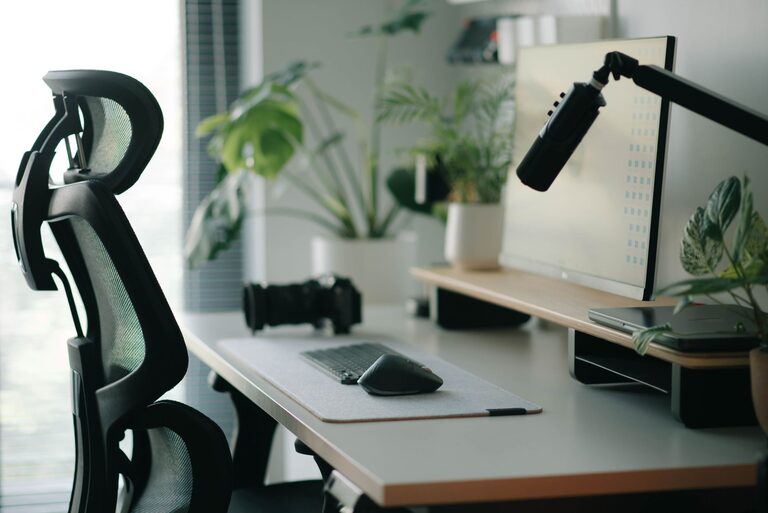
Creating a desk setup tailored for focus and comfort is essential for enhancing productivity and maintaining well-being throughout your work hours. Whether you work from home, in an office, or study, a thoughtfully arranged workspace can reduce distractions, ease physical strain, and improve concentration. In this post, we’ll explore practical tips to help you design your ideal desk setup.
Why a Good Desk Setup Matters
A well-organized and ergonomic desk setup helps you:
– Maintain good posture and reduce discomfort
– Minimize distractions for better focus
– Optimize your workflow and productivity
– Create a pleasant and motivating work environment
By paying attention to both comfort and functionality, you can improve your overall work experience.
Choosing the Right Desk and Chair
Desk Height and Size
Select a desk that fits your available space and provides enough surface area for your essentials—laptop or monitor, keyboard, mouse, notebook, and any accessories you use regularly. Standard desk height ranges from 28 to 30 inches, but it should allow your arms to rest comfortably at about a 90-degree angle when typing.
Ergonomic Chair
Invest in a chair with good lumbar support, adjustable height, and comfortable cushioning. Your feet should rest flat on the floor or a footrest, and your thighs should be parallel to the ground. Adjustable armrests can help reduce shoulder tension.
Monitor Placement and Screen Setup
Optimal Monitor Position
Place your monitor directly in front of you, about an arm’s length away. The top of the screen should be at or slightly below eye level to avoid neck strain. If you use a laptop, consider a stand to raise the screen and use an external keyboard.
Use Multiple Screens Wisely
If your work involves multitasking, using two monitors can increase efficiency. Arrange them side-by-side at the same height and close together to minimize head movement.
Keyboard and Mouse Position
Keep your keyboard and mouse close enough so your elbows remain near your body. This reduces shoulder and arm fatigue. Consider ergonomic keyboards and mice designed to promote a natural hand position.
Lighting for Focus and Comfort
Natural Light
Whenever possible, position your desk near a window to take advantage of natural daylight. Sunlight boosts mood and alertness, but avoid glare on your screen by using blinds or curtains.
Artificial Lighting
Use a desk lamp with adjustable brightness and color temperature to reduce eye strain during darker hours. Soft, warm light is best for relaxation, while cooler, bright light encourages alertness.
Desk Organization and Decluttering
Keep Essentials Within Reach
Organize frequently used items close by—pens, notebooks, phone charger—to avoid constant reaching or standing up. Use desk organizers, trays, or drawers to keep your workspace tidy.
Minimize Clutter
Remove unnecessary items to create a clean environment that supports concentration. A clutter-free desk can reduce distractions and help you focus on your tasks.
Incorporating Personal Comfort
Add Ergonomic Accessories
Consider using wrist rests, footrests, or seat cushions to enhance comfort. These small additions can significantly reduce physical strain over long periods.
Personalize Your Space
Adding a few personal items like a plant, photo, or artwork can make your workspace feel welcoming and boost your mood. Choose items that inspire without overwhelming your space.
Breaks and Movement
Even with the best desk setup, sitting still for too long can be harmful. Follow the 20-20-20 rule: every 20 minutes, look at something 20 feet away for at least 20 seconds to reduce eye strain. Stand up, stretch, or take short walks to improve circulation and reset your focus.
Cable Management
Tidy cables prevent clutter and hazards. Use clips, ties, or cable sleeves to bundle wires neatly. This simple step creates a cleaner, safer workspace.
Final Thoughts
Setting up a desk for focus and comfort doesn’t require expensive equipment or a complete room makeover. Small, intentional changes—like adjusting your chair height, organizing your tools, optimizing lighting, and incorporating ergonomic accessories—can make a big difference in your daily productivity and comfort. Experiment with your setup and find what works best for your unique needs to create a space where you can thrive.
—
By investing time into designing your workspace, you’ll enjoy improved focus, reduced physical discomfort, and a more enjoyable work experience every day.